
Query Fan-Out Explorer: Find the Questions Your Website Has Not Answered Yet
Turn a broad topic into a useful content plan. Explore query relationships, consolidate overlapping questions and write page briefs without pretending a map proves search demand.

7 years of experience building and operating brand websites, specializing in website development, paid advertising and SEO. Built a brand website from launch to US$10 million in annual sales.
The Short Answer
Query Fan-Out Explorer helps organize the questions related to a topic so you can plan useful content. Start with a real audience decision, inspect relationships and intent, and consolidate overlapping questions into pages. A map is a research aid, not proof of search demand or a view of a search engine’s private process.
Key takeaways
- Choose a seed question with a concrete audience decision.
- Group related questions instead of creating a page for every query.
- Validate opportunities with your content and available evidence.
“We need more content” is one of those sentences that sounds like a plan until somebody asks what the content should do. Then the room becomes very interested in its coffee. More articles? More product copy? Another guide with the word ultimate in the title? A website can publish enthusiastically for months and still leave a prospective customer with the same unanswered question.
The DTCUP Query Fan-Out Explorer helps you unpack a topic into related questions, intentions and possible content opportunities. It is a research workspace for exploring what a broader question might contain. You can examine clusters, review suggested queries, consider page opportunities and, when signed in, investigate a limited sample of your site’s coverage or add optional live source evidence.
The useful outcome is not a larger pile of keywords. It is a clearer decision about what to explain, which existing page to improve and whether a new page is needed at all. Sometimes the best result is one carefully revised buying guide. Sometimes it is a better product comparison. Sometimes it is discovering that the proposed article already exists and simply needs to stop hiding behind an unhelpful heading.
This guide uses an illustrative business selling compact desks for home workspaces. We will turn a broad topic into a practical content plan without pretending the generated questions are measured search demand. The example is a planning exercise, not a customer case study or a promise about rankings. Bring your own product knowledge; the tool brings another way to organize the questions.
Understand what a fan-out map represents
A broad query often contains several smaller decisions. Someone exploring a compact desk may need to understand dimensions, room layout, equipment space, assembly and the tradeoffs between different shapes. A topic map makes these dimensions easier to see together. Instead of treating the original phrase as the entire brief, you can examine the choices that sit behind it.
In DTCUP, the generated fan-out is explicitly a simulation of plausible related searches. Search engines do not expose their exact internal query sequence through this tool. The map is not a transcript of hidden Google activity, and the query list is not a search-volume report. Keeping that distinction clear prevents a useful planning aid from becoming a rather confident fairy tale.
Think of the map as a structured research hypothesis. It suggests questions worth examining, grouped in ways that may help you plan content. Your job is to determine which questions are relevant to the business, supported by evidence and useful to the intended reader. A plausible question can still be outside your expertise or unrelated to what you actually sell.
For the desk business, a cluster about measuring a room may be highly useful. A cluster about commercial office procurement may be outside the current audience. Both could be logically connected to desks, but only one belongs in the immediate plan. Relevance is a decision you make with context, not a quality automatically awarded to every branch of the map.
This is why the workflow works best when a knowledgeable person reviews the output. The tool can broaden your view and organize possibilities. It cannot know every product limitation, customer conversation or business priority unless that context is available and correctly interpreted. Treat the suggestions as the beginning of a useful discussion rather than the end of editorial judgment.
Choose a seed that names a real decision

A seed is the topic or question you want to explore. Start with language a prospective reader might use, but make the intended problem clear enough to produce a useful map. “Furniture” is enormous. “Choosing a compact desk for a shared living room” supplies a situation and a decision. It gives the exploration somewhere meaningful to begin.
Do not make the seed so narrow that it simply restates an article title you have already decided to write. If the goal is discovery, leave room for adjacent questions. The desk example can explore measuring, storage and practical constraints without committing in advance to a particular page format. You can choose the format after you understand the questions.
Use the optional context to describe the audience and business honestly. Perhaps the intended reader works from home in a small apartment and needs the room to serve another purpose after work. That context is useful. Claims that the business has the best desks, the lowest prices or guaranteed ergonomic benefits are not useful unless they are relevant, substantiated facts—and even then, promotional language is not a substitute for a clear research question.
Avoid placing private customer details or confidential business material into a seed when a general description will do. You can explain a recurring difficulty without including a person’s name or an unpublished document. The aim is to give the research enough context to be relevant, not to empty the contents of the company drive into a text box.
Before generating, finish this sentence: “I want to understand what this reader needs to decide before they can…” For our example, the ending is “choose a desk that fits the room and their working equipment.” That sentence becomes the standard against which you evaluate the output. Anything that does not help that decision needs a reason to remain in the plan.
Set market, language and mode deliberately
The form lets you choose a market, language and mode. These are not decorative settings. They help frame the exploration and remind the reviewer that audience context matters. A question useful in one market may require different terminology, examples or factual verification elsewhere. The output still needs review; choosing a market does not automatically validate every local detail.
Use the language in which you intend to plan or publish. If the desk business serves English-speaking customers in the United Kingdom, select that context and review the resulting vocabulary accordingly. Do not assume that translating a phrase solves every difference in reader expectations. The content should make sense to the audience, not merely pass through a language selector on its way to publication.
The General, Ecommerce and Content / SEO modes provide different emphases. Choose Ecommerce when the immediate question concerns product choices and buying friction. Choose Content / SEO when you are exploring how explanations and supporting pages might fit together. General can be useful when you want a broader view before narrowing the task. The best mode is the one that matches the decision you are trying to make.
Keep the input context attached to any exported research. A teammate looking only at a query list may not know which audience or market shaped it. A short note can prevent them from applying the suggestions to a different project. Research becomes more reusable when its assumptions are visible, not when they are quietly removed to make the spreadsheet look cleaner.
If the first result is broad, revise the seed or context with a specific observation. For example, focus on renters who need a desk to share a living area. Do not keep regenerating without changing the question and hope that novelty will become strategy. A clearer input usually gives you a clearer basis for evaluating the next result.
Explore the example before committing to research
Visitors can open the clearly labeled example research without an account. This is a useful way to learn the workspace: examine the overview, map, queries and opportunities before deciding whether to sign in for API-powered research. The example demonstrates the format. It should not be mistaken for a fresh result generated from whatever topic happens to be in the input field.
Read the example’s labels and topic before using it in a meeting. If you capture an image or export material for training, identify it as an example. That small label matters because polished interfaces can make illustrative content look like a live finding. Nobody should have to investigate the origin of a chart after it has already become slide seventeen of a presentation.
Use the example to answer practical questions about the workflow. Can you understand how the clusters relate? Which view would help an editor? Which information belongs in a planning document? Learning the interface this way lets you reserve actual research for a seed and context that are ready to evaluate.
When you sign in for generation or site analysis, read the current interface limits and status messages. Availability and usage allowances are part of the working context. If a request fails, distinguish that failure from a result that is merely unhelpful. A failed request has not established that the topic lacks opportunities; it has established that the requested research did not finish.
Keep your existing work visible while exploring. Do not replace an agreed content plan simply because a new map looks more exciting. Compare the suggestions with the questions the team already knows are important. The strongest use of a new tool is often to improve an existing decision, rather than give everyone an excuse to start the project again from the beginning.
Read the overview for structure before opening every query
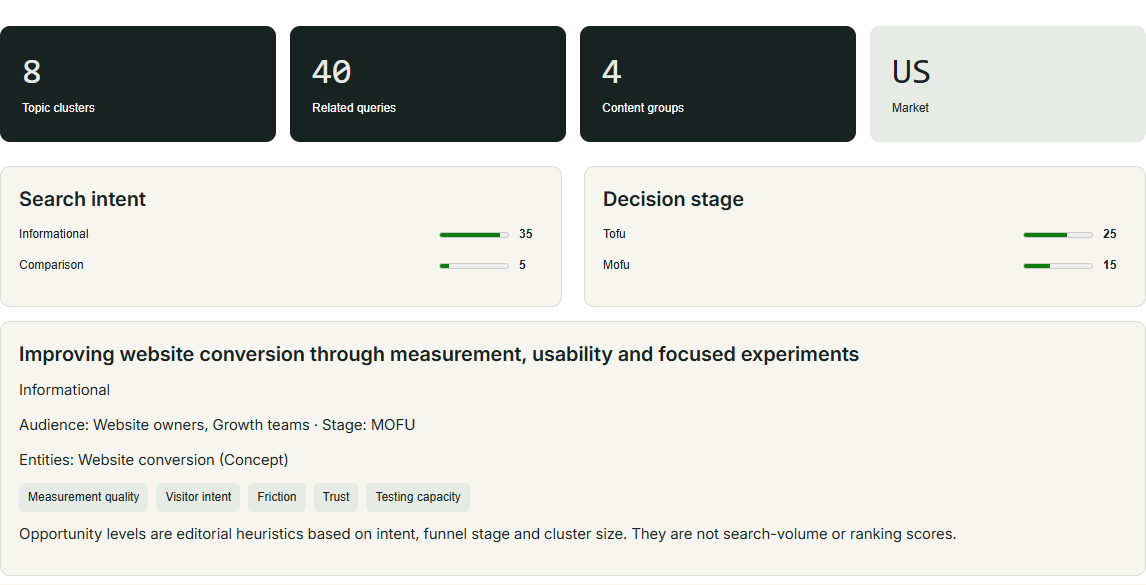
Begin with the broad organization. Which dimensions appear, and how do they relate to the seed? For compact desks, you might expect practical constraints, use cases and comparison questions. The actual generated structure should be reviewed on its own terms. Do not assume it will match a predefined list, and do not force it to include a topic simply because another business wrote about it.
Ask whether the map contains distinct questions or several versions of the same concern. “Will it fit?” can appear in language about width, room layout and equipment space, but these may have different answers. Other phrases may be near-duplicates that belong together. Your first pass is about understanding these relationships, not assigning an article to each visible item.
Mark ideas that require expertise the team does not have. A desk seller can explain verified dimensions and assembly requirements. Health or medical claims would need a different level of evidence and review. The presence of a related question does not create permission to answer it casually. Scope the plan to what the business can support accurately.
Look for omissions based on real customer knowledge. Perhaps buyers repeatedly ask whether a particular piece arrives assembled, but that concern is not prominent in the map. Add it to your planning notes. The generated structure is useful input, but it should not overrule documented questions from the people you serve.
At the end of this pass, write three or four themes in your own words. For the illustrative desk project: fit the space, accommodate the equipment, understand the practical tradeoffs and know what happens after purchase. If you cannot summarize the map without copying its labels, spend a little more time interpreting it before commissioning content.
Use the map to discuss relationships, not to decorate a slide
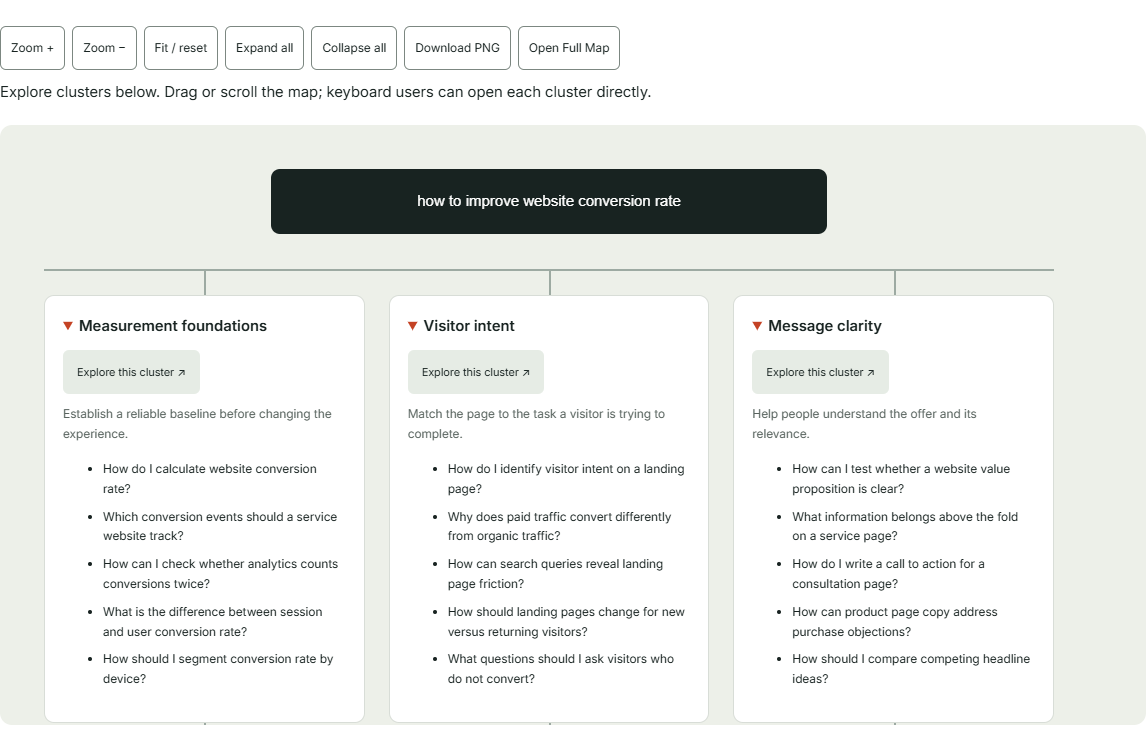
The Fan-Out Map view is useful when several people need to see how questions connect. A product specialist may notice a missing constraint. An editor may see that two clusters belong in one guide. A designer may recognize that an answer needs a visual comparison. The map gives those conversations a shared object instead of a series of disconnected suggestions.
Choose one cluster and explain why it exists. For a measuring cluster, the reason might be that buyers need to compare the available room with the product footprint before they can shortlist anything. That explanation is more important than the cluster’s visual position. A diagram is valuable when it helps people understand the decision behind the questions.
Use a map export when it will help a discussion, and keep the simulation label and seed context visible. The export is a representation of the research, not proof of demand. If you annotate it for an internal meeting, separate your editorial decisions from the tool’s original suggestions so that later reviewers can tell which is which.
Do not measure the usefulness of a map by how many branches it contains. A smaller set of distinct, relevant themes can produce better content than a sprawling diagram whose outer edges have wandered into unrelated territory. The internet is already very good at producing more things to read. Your job is to make the next thing worth reading.
Move from the map to a written decision. Identify which cluster deserves attention, why it matters and what existing evidence you have. That transition prevents the research session from ending with a beautiful picture and no owner. The map starts the conversation; the brief should finish it with a next step.
Evaluate intent as a reader’s task
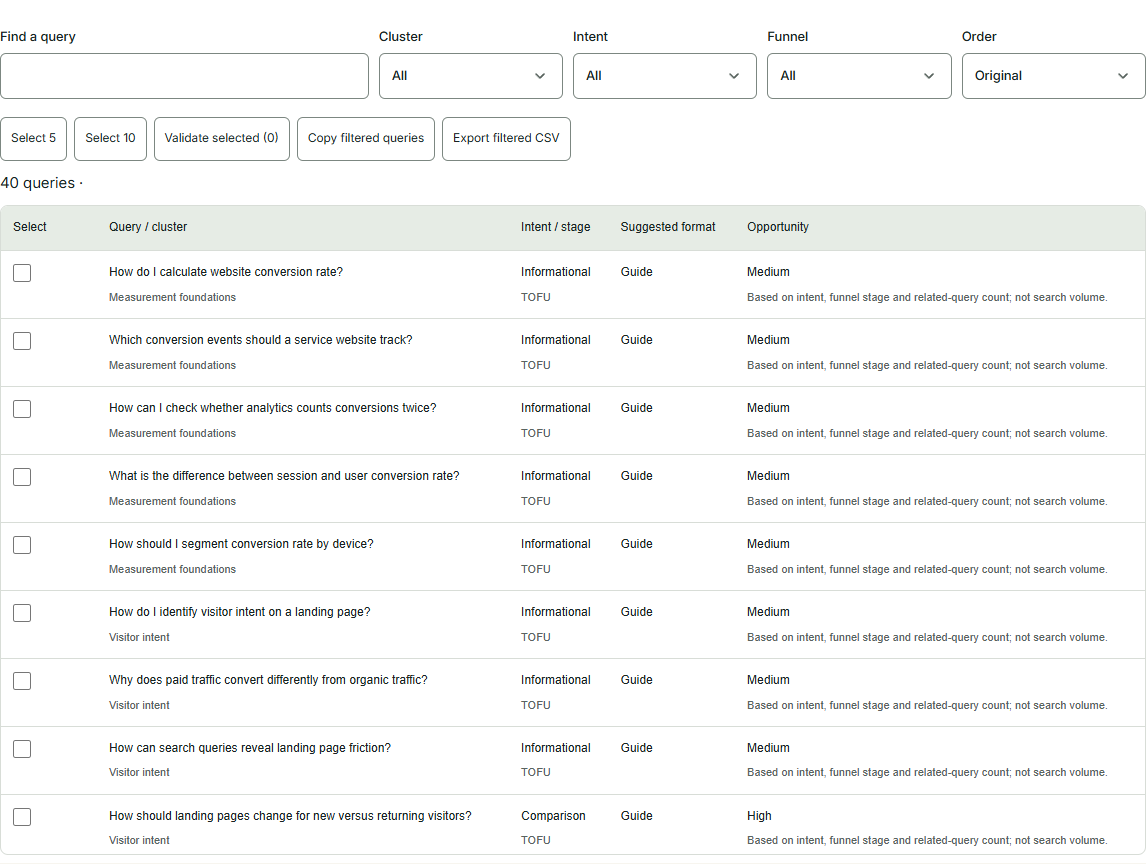
Intent labels help organize possibilities, but the useful question is what the person is trying to accomplish. Someone asking how to measure a room needs instructions. Someone comparing two desk shapes needs tradeoffs. Someone checking assembly requirements needs a factual answer. These tasks may be related without requiring the same kind of page.
Write the task beside each candidate opportunity. For example: “Help the reader check whether the desk and chair can work in the available space.” That is more concrete than “target informational intent.” The task tells an editor what the page needs to accomplish and gives a reviewer a way to judge whether the draft succeeds.
Do not force a purchase action into every answer. A reader who is still measuring the room may need a useful checklist before a product recommendation. The business can make the next relevant step visible without interrupting the explanation. Helpful content can support a commercial journey while still respecting the question the person arrived to answer.
Likewise, do not bury a straightforward buying question inside a long essay. If the reader needs to know the verified dimensions of a particular model, answer clearly on the relevant product page. A separate article may add little. Content planning includes deciding where information belongs, not only deciding how much prose to produce.
Use intent as a way to choose the right response. That response might be a guide, a comparison table, an improved product section or a support answer. The Explorer’s suggestions help surface options; the final format should follow the reader’s task and the evidence you can provide.
Consolidate questions into pages that earn their existence
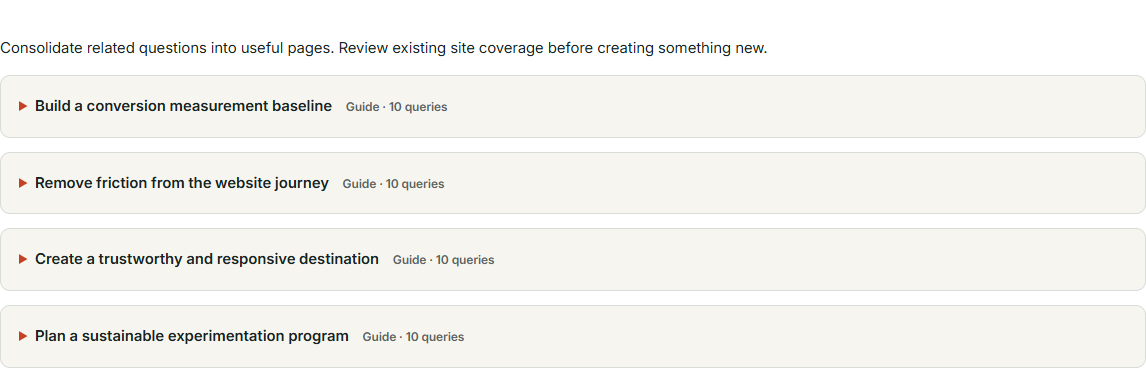
A query list is not a publishing calendar. Several related questions may belong on one coherent page. For our compact-desk example, measuring width, considering depth and checking available working space could form sections of a practical fit guide. Publishing three thin pages may make the explanation harder to use without adding a meaningful benefit.
Group questions by the decision they help the reader make. Keep questions together when they share the same audience, context and next step. Separate them when a different task requires substantially different evidence or depth. This approach gives each page a reason to exist beyond the fact that a phrase appeared in a generated list.
Write a provisional page promise for each group. “A practical method for checking whether a compact desk fits your room and equipment” is a useful promise. Then list the evidence needed: verified product dimensions, an illustrative layout and clear measurement instructions. If the team cannot supply that material, resolve the gap before scheduling the article.
Sketch the proposed guide or comparison in Sketch to Website when the information arrangement matters. A labeled drawing can show where the measuring steps, visual explanation and product links belong. It turns the content plan into a reading experience the team can discuss before anyone invests in a polished design.
Keep an explicit “improve existing page” option in the plan. New content is not inherently more valuable than clearer existing content. Sometimes adding a well-placed explanation to a frequently used page solves the problem directly. The best opportunity is the one that helps the reader, even if it does not give the team another launch announcement.
Use site coverage as a limited investigation
The My Site Coverage workflow is available for signed-in analysis of a limited sample of public pages. It can help identify possible matches between the research and existing content. The word limited is important: the result is not an exhaustive inventory of every URL, hidden state, language version or document associated with the business.
Review the candidate page itself before deciding that a question is covered. A page may mention the same terms without answering the reader’s task. The desk business might have a product page that lists width but no guidance for comparing the desk with a room. A possible match is a starting point for evaluation, not automatic proof that the content job is finished.
Also be careful with apparent gaps. If a useful page was not in the inspected sample, it may still exist. Check your content inventory and relevant site sections before commissioning a replacement. Otherwise, a tool intended to reduce duplication can become the reason you publish the same answer twice with slightly different headings.
Record your coverage decision in plain language. “Existing product page has dimensions; add a link to the measuring guide” is useful. “Covered” is sometimes too vague. “No relevant page found in the inspected sample; editor to confirm inventory” is more honest than declaring that the entire site lacks the topic.
The advantage of the coverage view is that it connects research with content you already have. It encourages an improvement decision instead of an automatic publishing decision. Used carefully, that can save work and make the site easier to navigate. Used carelessly, it is simply a faster route to a content plan nobody has checked.
Add live source evidence when it will change the decision
Optional live validation can add dated source evidence to selected research questions. Use it when external context would help you assess an opportunity or verify how a topic is being discussed. The purpose is to support a decision with inspectable material, not to put a scientific-looking badge on every generated phrase.
Read the sources that matter to your conclusion. A source title or summary may not contain the nuance needed for an accurate statement. Check the date, context and relevance to the intended market. If you plan to use a factual claim in published content, verify it against an appropriate source rather than treating its appearance in the research workspace as sufficient proof.
Live validation does not measure search volume, ranking difficulty or guaranteed AI citations. Keep those absences explicit in internal decisions. A question can have relevant source evidence without being a high-demand search term. It can also be useful to your customers even when you have no quantitative demand estimate. Those are different reasons for choosing it.
For the desk example, external sources might help identify terminology or the kinds of comparisons already available. The business’s own product specifications still govern claims about its products. Do not let a general article about desks become evidence for a dimension, material or feature your model does not have.
Choose a manageable subset of questions to validate. Start with the decisions that would materially affect the brief: whether the angle is distinct, which facts need verification and what the existing discussion leaves unclear. A source list becomes useful when someone evaluates it. Collecting more links without reading them is merely giving procrastination a bibliography.
Compare content approaches fairly
The Explorer can help you consider how your content might be more useful than the material you have reviewed. Make the comparison specific. Perhaps your proposed guide includes a measurement example using actual product dimensions, while the pages you examined remain general. That is a concrete editorial difference you can verify, not a claim that your entire website is superior.
Avoid statements about competitors that you have not checked. A tool or website may have capabilities you did not encounter. If you compare approaches, describe the observed workflow and the circumstances in which yours helps. “This guide puts the measurement steps beside the product dimensions” is stronger and fairer than “Other sites never help customers choose.”
Use primary knowledge where the business has it. Product specialists can explain real constraints. Support teams can identify recurring misunderstandings. Editors can turn those insights into clear examples. The generated research helps organize the questions, but distinctive content often comes from verified details that your team can explain accurately.
Decide what you will leave out. A compact-desk guide does not need to become a history of office furniture because the map found an adjacent topic. Exclusions protect the page’s usefulness. Readers should be able to follow the promised decision without taking an unexpected detour through several centuries of seating arrangements.
Write the difference into the brief as a deliverable. For example: include one room-measurement diagram, one equipment checklist and links to verified dimensions. That makes the advantage something the team can produce and review. A vague instruction to be “more comprehensive” often results in more words without a clearer answer.
Prioritize opportunities without inventing demand scores
Start with relevance to the business and usefulness to the reader. Does the question occur in genuine customer conversations? Does it affect a meaningful decision? Can the business answer it with reliable information? These criteria can support a practical priority even when the tool does not provide search volume or ranking difficulty.
Then consider the existing content and the effort required. An important answer may need only a focused revision to a current page. Another opportunity may require photography, product verification or expert review. Make those dependencies visible before promising a publication date. A content calendar should reflect the work needed, not only the enthusiasm present during planning.
Use a simple editorial judgment rather than dressing guesses as precise numbers. You might group opportunities into act now, investigate and later. Explain the reason for each placement. If you have additional quantitative evidence from another authorized source, keep its origin and definition separate from the Explorer’s modeled suggestions.
For the desk business, a fit guide may come first because customers repeatedly ask about space and the team already has verified dimensions. A broader trend article may wait because it does not address the immediate decision. This is a reasonable business choice, not proof that the first topic has higher search volume. Say what you know and let the unknown remain unknown.
Limit the first batch to what the team can produce well. Three useful pages with clear ownership can be a better start than thirty ideas with no evidence plan. Research should reduce uncertainty enough to begin meaningful work. It should not become an endless competition to discover one more branch before anybody is allowed to write.
Write a brief that survives the handoff
A strong brief identifies the reader, the decision, the page promise and the evidence needed. Include the relevant cluster and selected questions, but translate them into a coherent assignment. The writer should understand why the page exists without having to reverse-engineer the entire research session from an exported CSV.
For our example, the brief might ask for a guide to checking desk fit in a shared room. It would require verified dimensions, an illustrative measurement sequence, explanations of practical tradeoffs and links to the relevant product information. It would exclude unsupported health claims and invented customer stories. Those boundaries make the draft easier to write and review.
Plan visuals where they explain a decision. A diagram can show what to measure. A photograph can demonstrate a real detail. If you have a legitimate model, the Online 3D Viewer can help inspect it before deciding whether it contributes to the explanation. The model’s existence does not remove the need for accurate dimensions or clear copy.
If the proposed page includes an interactive element, use the HTML, CSS & JavaScript Editor to explore the idea with a small prototype. Keep any example values clearly illustrative. A prototype can help the team discuss the behavior, but the final feature still needs implementation and review in the actual website environment.
End the brief with acceptance criteria the reviewer can observe. Does the page answer the selected questions? Are product claims verified? Can the reader find the next relevant information? Are the visuals accurate and understandable? These questions are more useful than asking whether the draft “feels SEO enough,” a phrase that deserves a quiet retirement.
Keep the writing useful after the research is finished
Do not write the article as a sequence of generated queries with paragraphs attached. Use the research to understand the reader’s path, then create a natural explanation. The desk guide might begin with the room, move to equipment needs and finish with product comparison. The final structure should help a person follow the task, not display every item the tool produced.
Answer the important question early. If the reader wants to measure a space, give them a clear starting action before a long introduction. Supporting context can follow where it helps. A friendly tone and a little humor can make the explanation approachable, but the reader should not have to search through jokes to find the instruction they came for.
Use examples that are labeled and internally consistent. If you introduce a hypothetical room, keep its dimensions and assumptions clear throughout the explanation. Do not turn illustrative numbers into product facts. When an example depends on real specifications, verify them against the source material before publication.
Link to related tools and pages when the reader reaches the relevant task. For instance, preparing accurate markup can lead naturally to the Website Schema Generator. The link should support an action the reader understands, rather than interrupt the article with a catalog of things the business would like them to visit.
After writing, read the draft without the research interface open. Does it stand on its own? A reader should not need to understand fan-out maps to benefit from the final guide. The tool is part of the production process; the published content earns its place by answering the person’s question clearly.
Check the page before sending people to it
Once the content is implemented, inspect the actual public page. The Website Page Checker can help review technical SEO, laboratory speed and supported automated accessibility findings. Those checks complement the editorial review. They do not establish that the article is accurate, complete or guaranteed to attract an audience.
Review the title and description in relation to the page’s real promise. Avoid borrowing the same ending across every guide. A measurement article and a comparison page deserve distinct metadata because they serve different tasks. The research can inform the vocabulary, but the final wording should describe the actual page rather than a collection of aspirational keywords.
Examine crawl instructions where appropriate with the AI Bot & Robots Checker. Keep declared rules separate from proof of indexing or actual crawler visits. A well-planned article still needs a sensible public implementation, but no single tool can guarantee how every search or AI system will use it.
Manually review the mobile reading experience. Check whether diagrams are legible, headings make sense and important links are easy to find. If the article asks the reader to compare details, ensure the layout supports that comparison at a smaller width. The planning map will not rescue a useful diagram rendered at the size of a postage stamp.
Correct the problems that affect the intended task, then verify the published result. Keep the final page connected to its brief so that the team can see what was delivered. The content opportunity has become useful only when a real reader can reach and understand the answer.
Connect publication with a deliberate distribution plan
Publishing a guide is one step in helping people find it. Decide where the article belongs in the existing site and which relevant pages should link to it. For the desk example, a product page might link to the measuring guide at the point where dimensions become a decision. That placement is more useful than a generic article link added somewhere near the footer.
If the guide supports a campaign, coordinate timing with the Campaign Time Zone Planner. Use the calendar and conversion views for the scheduling question they address. The content still needs enough preparation time for factual review, images and implementation. A launch date is not a machine that turns unfinished paragraphs into finished ones overnight.
Prepare consistent distribution links with the UTM, QR & Campaign Links tool. Name the campaign clearly and test the final destination. If a QR code appears in printed material, consider what the page should do when someone scans it later. The guide should remain useful beyond the exact hour the promotional message was sent.
Choose a few relevant places to share the page rather than assuming every channel needs the same message. A support response, a product page and a campaign email may introduce the same guide differently because the reader’s context differs. The research helps explain the questions; distribution should meet people where those questions arise.
Keep claims about results modest until evidence exists. A new article is a published answer, not an automatic increase in traffic or sales. Decide what you will observe after release and which sources can support those observations. This makes the launch a learning opportunity rather than a celebration built entirely from the fact that a button was pressed.
Return to the research with evidence from the real site
After publication, gather questions that remain unanswered. Support conversations, editorial feedback and relevant website observations can all help. Look for specific difficulties rather than asking only whether the article is popular. A reader who reaches the guide but still cannot identify the right measurement step has given you a practical improvement question.
Where connected sources and coverage allow, DTCUP Intelligence can help investigate business activity and journeys around the wider experience. Keep attribution and causation distinct. An order associated with a channel does not prove the new guide caused the purchase, and missing historical coverage can limit what is visible. Use the evidence to ask better questions rather than force a success story.
Compare the original brief with what the page now answers. Perhaps the guide needs a clearer diagram or a link to a practical product detail. Perhaps a separate question genuinely deserves another page. Let observed needs refine the plan. There is no requirement to publish every idea generated in the first research session simply because it remains in a file.
Refresh facts and sources when the topic changes. Product specifications, available models and relevant external information may need review. The research date helps establish when an observation was made; it does not make that observation permanently current. Assign ownership for updates when the page becomes part of an important customer journey.
The strongest use of the Explorer is a repeated editorial habit: ask a clearer question, inspect the possibilities, verify the evidence and improve the answer. It is useful because it connects a broad topic with concrete content decisions. The map may begin with many branches, but the best ending is often one page that finally explains the thing your customer needed to know.
Sources
Try a related toolQuery Fan-Out Explorer ↗
Still have a question?Ask the DTCUP Community ↗