
Launch at the Right Time: Campaign Time Zones and Country Calendars Without the Spreadsheet Gymnastics
Coordinate one global launch or repeated local-time events. Resolve daylight-saving questions, compare country calendars and export a schedule your team can actually use.

7 years of experience building and operating brand websites, specializing in website development, paid advertising and SEO. Built a brand website from launch to US$10 million in annual sales.
The Short Answer
First decide whether your campaign is one global event or an event repeated at the same local clock time. Then choose cities, confirm the interval and daylight-saving handling, and inspect relevant country calendars. Export an agreed schedule while keeping future date status and calendar coverage visible to the people executing it.
Key takeaways
- One instant and the same local time are different schedules.
- Check region and date status before committing to a holiday plan.
- Exported calendar files are snapshots, not live updates.
The campaign is ready. The landing page looks good, the links have names that make sense and someone has finally approved the headline. Then a message arrives: “We launch at nine.” Nine where? Nine on which date? Nine for everyone at the same moment, or nine in every customer’s city? A sentence that appeared to simplify the plan has just created an international puzzle.
The DTCUP Campaign Time Zone Planner brings two related tasks together: converting campaign times across cities and exploring country calendars. It helps you distinguish one global launch from a series of local launches, see the relevant local dates and work backward to preparation milestones. The country calendar adds context through supported holidays and planning markers, with coverage and source information available for review.
You do not need an account to use it. The plan stays in the page’s memory, and exports happen when you choose them. This makes the tool useful for a focused planning session without setting up another project-management system. It also means you should deliberately copy or download the schedule you want to keep before reloading the page.
This guide follows an illustrative small brand preparing a product announcement for several markets. The examples explain planning decisions rather than prescribing the best advertising hour or promising a sales result. Good timing starts with knowing what the clock means. The planner helps with that; it cannot guarantee that the audience will appreciate your email merely because it arrived punctually.
Decide whether the campaign happens once or several times
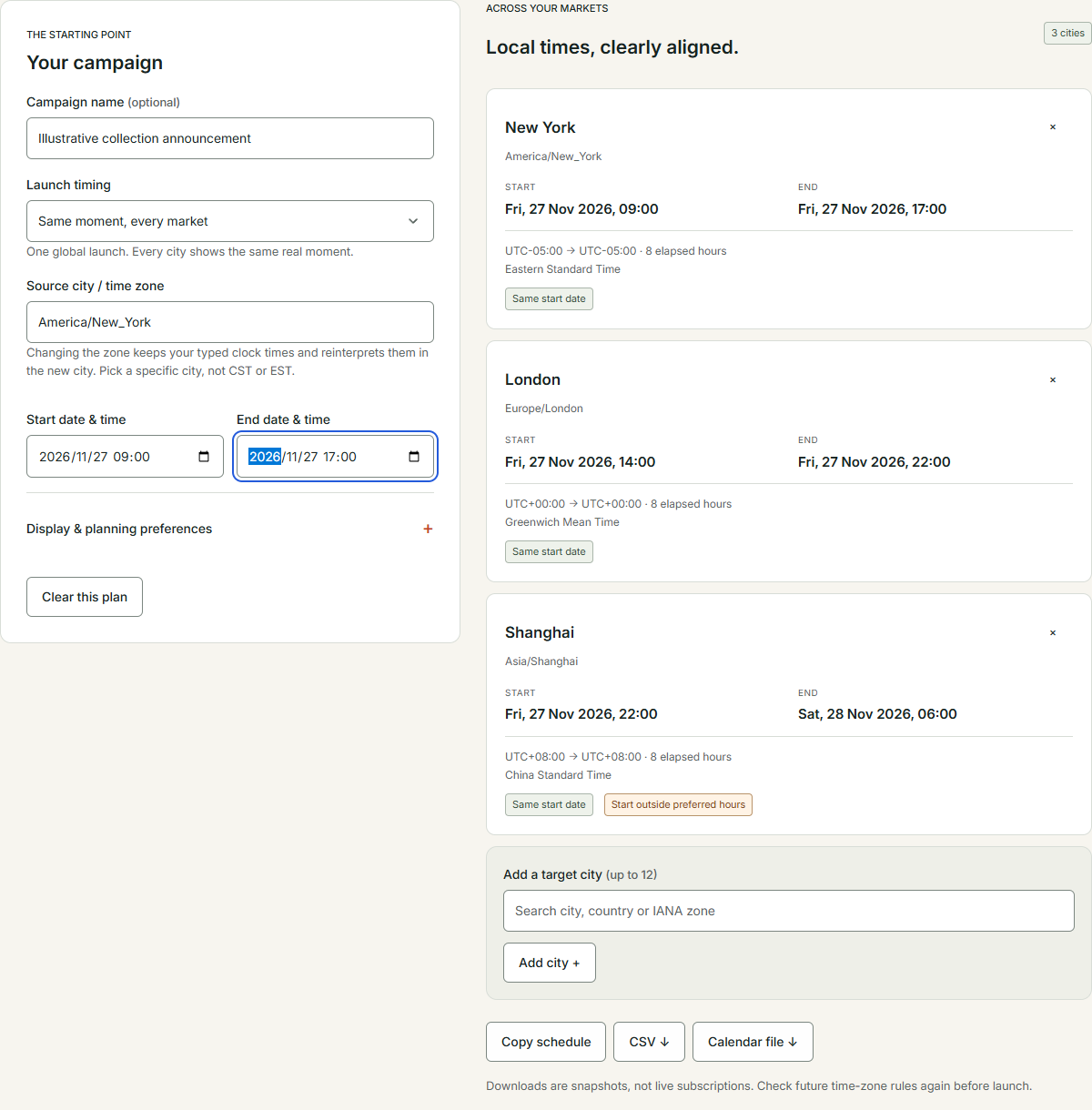
The first choice is conceptual, not numerical. A global announcement happens at one real moment. People in different cities see different local clock times for that same moment. A local-time campaign happens separately in each location: for example, the message may be intended to start in the morning in every market. Those are different schedules even when both are described casually as a worldwide launch.
Use “Same moment, every market” when the event itself is shared. A live presentation, a coordinated announcement or a single inventory release may need one instant understood across the team. The planner converts that instant into the local time for each target city. The different displayed times are not separate launches; they are local views of the same launch.
Use “Same local time, each market” when the desired clock time is the common element. A regional campaign might begin at the same local hour in each selected city. In that case, the actual moments differ. Someone monitoring the campaign should expect a sequence of starts rather than one simultaneous event. The choice affects staffing, content availability and how you explain the schedule.
Write the chosen mode into the campaign brief before entering dates. “One global announcement” is clear. “Local morning rollout in each market” is also clear. “Launch everywhere at nine” is a sentence that needs further work. Resolving it early prevents different teammates from building different schedules while sincerely believing they agree.
If the campaign includes both kinds of activity, plan them separately. The public announcement might be global while follow-up messages are local. Do not force both into one ambiguous row. The planner can help you examine each schedule, and your final handoff should explain how the activities relate.
Choose a city instead of relying on an abbreviation
Select the source city or time zone deliberately. A country can include multiple zones, and familiar abbreviations can refer to different places. A named city or an IANA zone identifier gives the plan a more specific reference. For a team coordinating from New York, that is more useful than assuming everyone interprets a short label the same way.
The source zone tells the planner how to interpret your typed clock times. In this tool, changing the source zone keeps the entered date and time and reinterprets them in the new city. That is a meaningful behavior to understand. If you change the city after entering the schedule, review the results again rather than assuming the original global moment has been preserved.
Choose target cities that reflect the actual people or markets involved. “United States” is not enough for a precise local clock. If the campaign needs coordination across several American zones, add the relevant cities. The same principle applies to other countries with multiple zones. A country calendar and a time-zone conversion solve related but distinct questions.
Keep the zone names visible in the handoff. A local time copied without its location loses essential meaning. The person setting up the campaign should be able to identify the intended zone without reconstructing the conversation that produced it. This is especially important when the recipient works in a different region from the person preparing the plan.
Avoid using your own computer’s current time as an unstated assumption. A teammate traveling abroad or working through a remote environment may see different local defaults. The planner’s visible inputs let you make the intended reference explicit. A good schedule should survive someone opening it from an airport lounge with very poor coffee.
Enter the start and end as a complete interval
Give the campaign a useful name if you want it to remain recognizable in copied or downloaded material. Then enter both the start and end date and time. The end deserves attention because it may fall on a different local date in another city. A campaign described as “Friday only” can be less obvious when the audience and operating team live far apart.
Read the interval as a real operational instruction. What changes at the start? What changes at the end? The tool converts the schedule, but it does not decide whether a page, offer or message should stop being available. Write those actions into the campaign plan so that the dates correspond to something the team can implement.
Check that the entered end makes sense relative to the start. If the tool reports an error or an unresolved time, address it before exporting. Do not copy the visible values into another system and hope the ambiguity disappears there. Moving an unclear schedule between tools usually preserves the confusion with slightly different typography.
For the illustrative brand, the announcement may have a clear start while a supporting information page remains useful afterward. That does not mean every campaign asset needs the same end behavior. Separate the time-bounded activity from the evergreen destination. This prevents a campaign schedule from accidentally becoming an instruction to remove useful information.
Review the interval after changing the mode, source zone or either date. These inputs are connected. A plan that was correct five clicks ago may no longer express the same intention. A final deliberate read-through is quick compared with explaining why one market received a closing message before its launch message.
Add the cities that need an answer
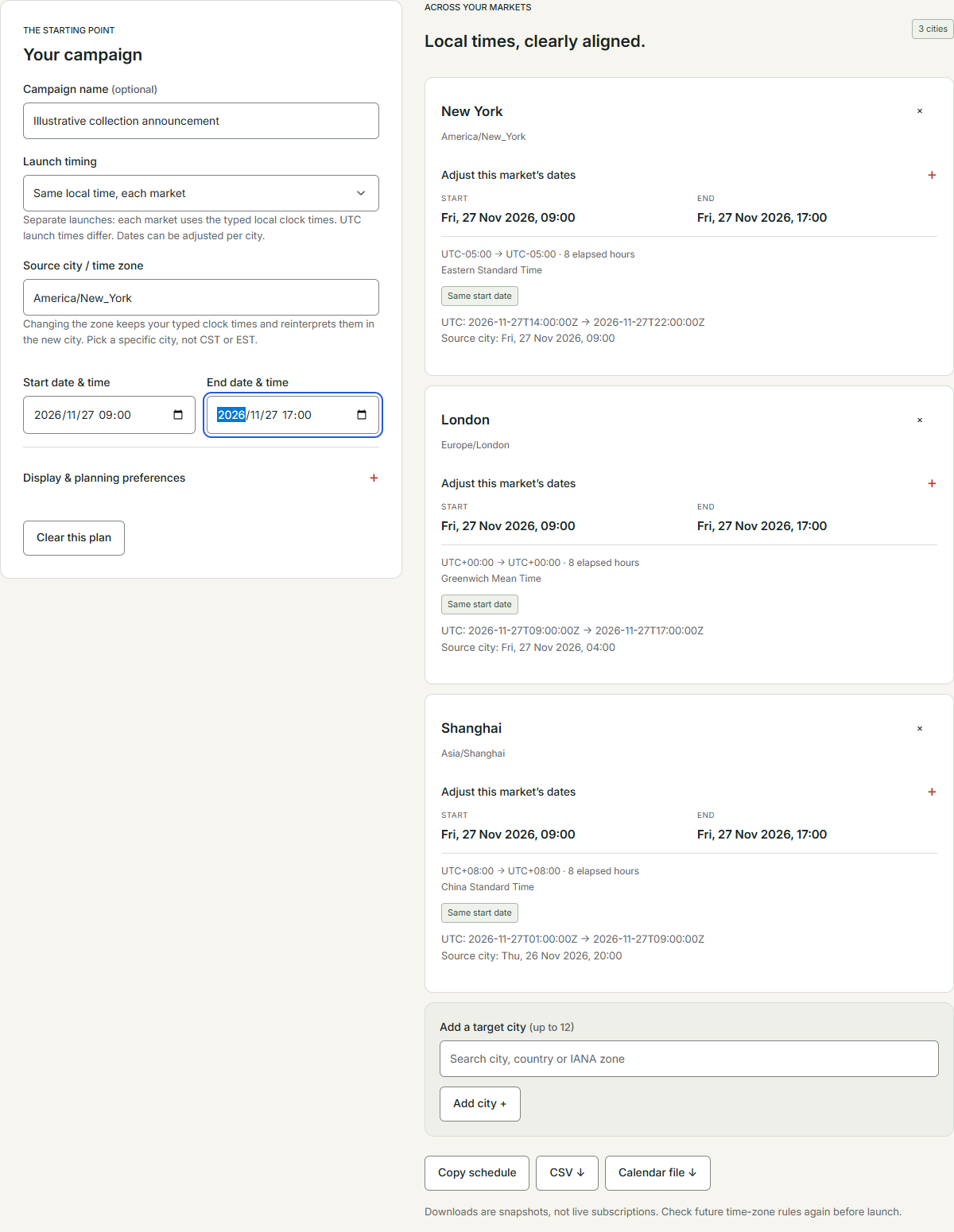
The converter supports up to twelve target cities. Use those slots for locations that matter to execution or communication. You might include the team’s coordination city, key customer markets and a support team’s location. More cities are not automatically more useful; each should answer a practical question about who needs to understand the schedule.
Read each result card for the local start, local end, zone information and date relationship. The date can be just as important as the hour. A person reading only the time may overlook that the launch occurs on the previous or next calendar day in their location. The tool makes that relationship visible so it can become part of the plan.
If a city is included only for internal coordination, label that role in your handoff. A support team’s working location is not necessarily a campaign market. Mixing the two without explanation can make the schedule appear to target places it does not. The planner provides the time conversion; the brief should provide the role of each row.
Remove locations that no longer matter rather than leaving them as unexplained leftovers from an earlier version. A concise schedule is easier to verify. It also reduces the chance that someone configures an unnecessary local launch because they assumed every listed city represented an intended audience.
Before sharing, ask one colleague to read back the schedule for their location. They should be able to state the date, time and relevant action without additional explanation. This small check reveals whether the plan communicates clearly. If the answer requires a long clarification, improve the handoff before the campaign reaches a larger group.
Treat preferred-hour warnings as planning hints
The display and planning preferences let you choose a clock format and preferred hours. These settings help identify starts outside a range you consider convenient. They are not a prediction of when customers will buy, when an office is open or when an advertising platform will perform best. The meaning comes from the preference you set.
For a team coordinating a live announcement, preferred hours might represent when reviewers can reasonably be available. For a different plan, they might be a rough audience consideration. State which interpretation you are using. Otherwise, a warning that was intended for staffing can be mistaken for a recommendation about marketing performance.
Use a warning to begin a decision, not to trigger an automatic reschedule. A global event may legitimately occur outside preferred hours in some locations. The team can then decide whether coverage, a recording or a different follow-up is needed. The planner helps make the tradeoff visible; it does not eliminate the tradeoff.
Weekend labels deserve the same care. They identify a calendar relationship, not a universal statement about business closure or customer behavior. Different organizations and markets operate differently. If availability matters, confirm the actual arrangements rather than treating the label as a substitute for asking the responsible people.
Keep the preference settings with the reasoning if they influence the final schedule. “Moved the review earlier to fit the support team’s agreed hours” is a useful explanation. “The tool said it was bad” is not. The software has supplied a comparison; the team remains responsible for choosing what the comparison means.
Handle daylight-saving ambiguity before it becomes an export
Some local clock times do not map cleanly to a single moment when clocks change. A time can be skipped during a forward change or repeated during a backward change. The planner flags these cases. For a repeated time, it asks you to choose the occurrence using the associated offset. For a skipped time, the entered time needs correction.
Do not treat the choice as an inconvenient formality. If the clock time occurs twice, the two possibilities are genuinely different moments. Ask which one matches the intended event and confirm the offset in the plan. The tool will not export an unresolved ambiguity, helping you address the issue before it reaches a calendar file.
Time-zone rules can change. IANA’s time-zone information explains that its database is updated to reflect changes to boundaries, offsets and daylight-saving rules. For a future campaign, review the schedule again near launch and keep relevant software current. An early planning export is useful, but it should not be treated as a permanent guarantee about future civil-time rules.
Avoid memorized offsets as the primary planning method. A city that is a familiar number of hours away at one point in the year may not have the same relationship at another point. Enter the actual campaign date and the specific zones, then inspect the results. This is exactly the sort of arithmetic that becomes unreliable when handled from memory during a busy week.
If the event crosses a clock change, examine both ends and the elapsed duration shown by the tool. Do not assume that a familiar-looking clock interval tells the whole story. The purpose of the review is to make the intended real interval explicit, especially when another system will execute actions based on those values.
Work backward to preparation instead of scheduling only the applause
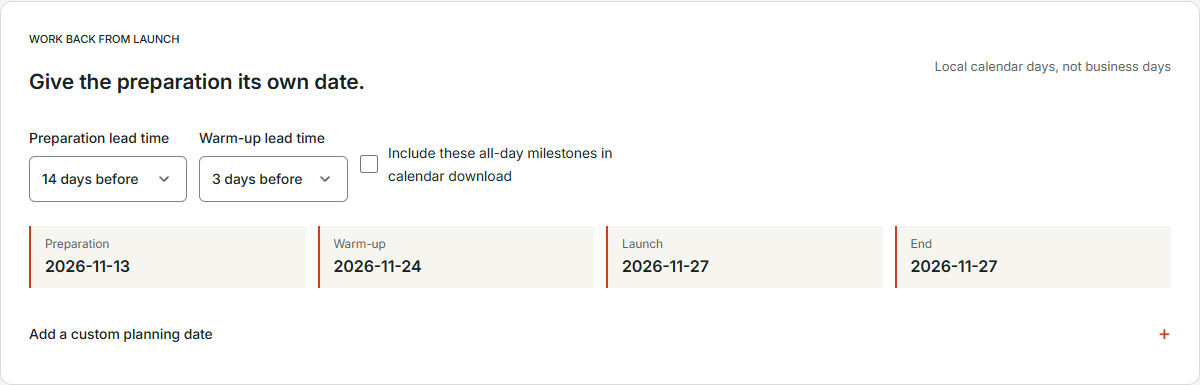
A launch time is not a preparation plan. The tool provides preparation and warm-up lead times so that earlier work has its own dates. Choose the interval that fits the campaign, then review the resulting milestones. These offsets count local calendar days, not business days, and the distinction matters when a date falls on a weekend or holiday.
Use the preparation milestone for a concrete deliverable. For example, the landing-page structure might need approval by that date. Use the warm-up milestone for another defined action, such as final link review or a planned announcement. A milestone called “prepare” is better than nothing, but a milestone with an owner and an observable result is much easier to execute.
Add a custom planning date when the preset offsets do not express an important dependency. Creative sign-off, translation review or a final operational check may deserve its own date. The planner gives you a place to represent the date; it does not assign the work or notify the responsible person automatically. Carry those responsibilities into your team’s actual workflow.
If the page layout is still unclear, use Sketch to Website during the preparation stage. Draw the information order and primary action before the final countdown begins. A rough layout reviewed early can prevent a late discussion about whether the campaign even has a coherent destination.
Review preparation dates against the country calendar rather than assuming that subtracting days produces a workable deadline. The arithmetic can be correct while the date is inconvenient. That is why the converter and calendar belong in the same planning conversation: one aligns moments, and the other adds relevant local context.
Use the country calendar to add context to the clock
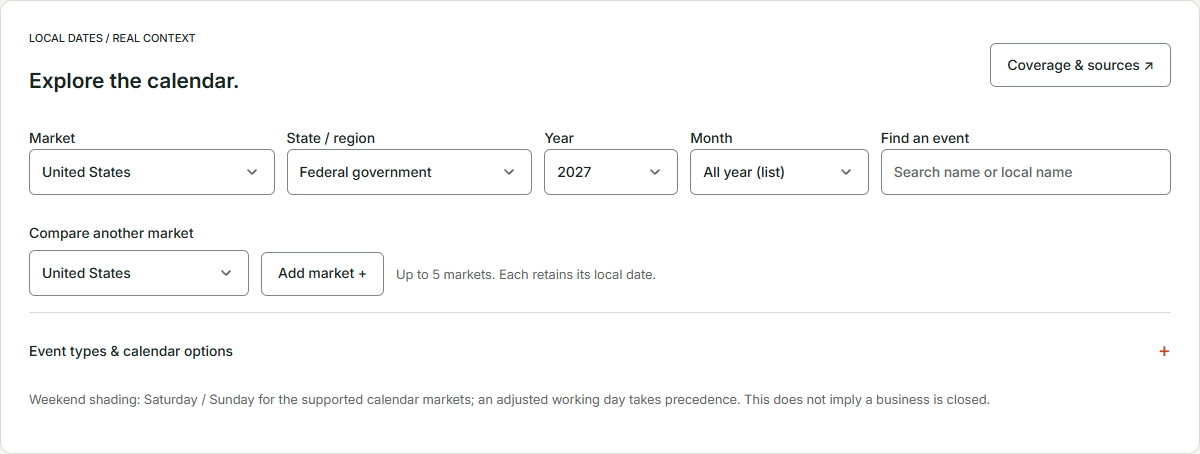
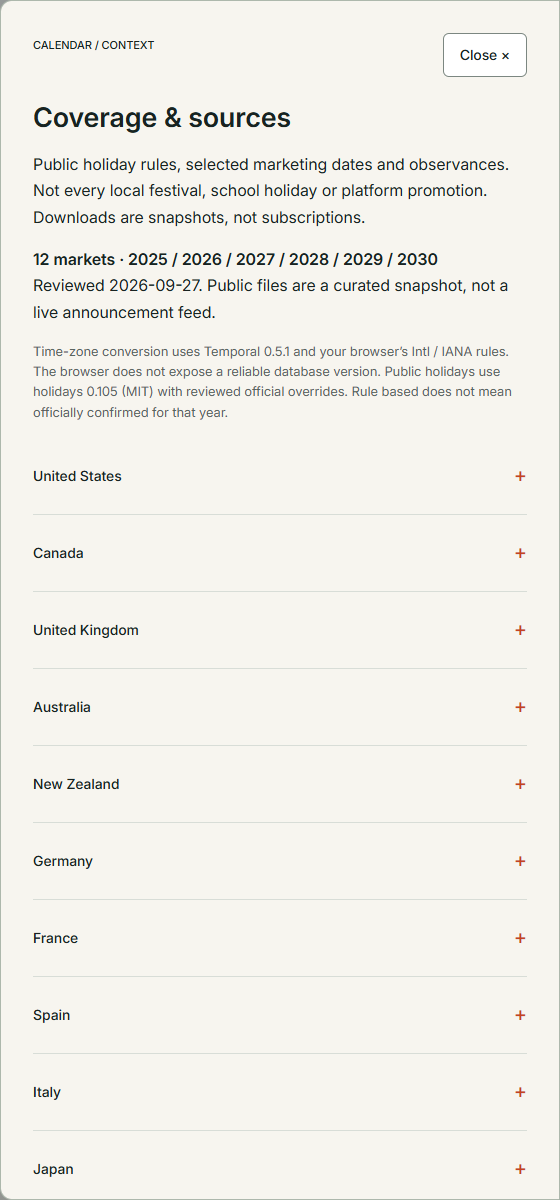
Open Country calendar when you need to explore supported events and holiday rules. Select the market, state or region where available, year and month. The calendar includes years through 2030 in the current edition. Its coverage varies by market and category, so read the Coverage & sources panel rather than assuming every local event is included.
The current calendar includes supported national and regional public-holiday rules for twelve markets, selected retail planning dates and two UN observances. This is a defined dataset, not a promise to contain every festival, school break, platform promotion or local business closure. The coverage notes tell you where a separate source check is still needed.
Use the list view when you want to scan events over a broader period, including the all-year selection. Use the month view when the relationship between dates is useful. The best view depends on the question: finding relevant planning moments across a year is different from checking the week around a specific launch.
Search by an event’s name or local name when you are looking for something specific. Then open the event details and inspect its status and source context. The existence of an entry is a starting point for planning. It does not automatically establish that the date applies to every region, employer or commercial activity you care about.
For the illustrative brand, the calendar might reveal that a proposed review date coincides with a relevant local observance. The correct response is to confirm the team’s availability and adjust if needed. The tool helps you notice the question early enough to act, rather than discover it when the approval message receives several automatic replies.
Keep countries, regions and cities in their proper roles
A country selection provides calendar context. A region selection refines that context where supported. A city or IANA zone provides a precise time-conversion reference. These choices are related, but one should not silently stand in for the others. Selecting a country does not establish a single clock for every location within it.
For a market with regional differences, choose the region relevant to the campaign or team. If the exact region is not covered, read the available scope and consult an appropriate source. Do not assume that a national entry answers every local question. The absence of a regional item in the tool is not evidence that no regional event exists.
When comparing markets, explain which region each selection represents. A schedule prepared for one part of a country may not apply unchanged elsewhere. Keeping the region beside the market prevents a useful comparison from becoming overly broad when someone forwards it to another team.
Preserve local dates for all-day events. A holiday shown on a local calendar date is not the same thing as a timed global launch. The tool keeps all-day holidays on their local dates in exports. Do not invent an exact launch time from an all-day entry unless you separately choose and verify that time in the converter.
This distinction also helps when writing campaign copy. A local observance, an internal deadline and a public sale window are different things. Give each the correct label. A calendar marker should not accidentally become a customer-facing claim that the brand is running an offer or that a particular business is closed.
Read date status before turning an event into a promise
Calendar entries can carry different statuses, including confirmed, rule based and tentative. Read these labels along with the linked source. They communicate how the date is represented in the dataset. A rule-based date may be useful for planning, while an official announcement can provide another kind of confirmation. Do not flatten these distinctions into one generic “approved date.”
The current edition specifically notes that China’s official break and adjusted-working-day arrangements for 2027 through 2030 remain pending. That is a coverage limitation worth keeping visible in future plans. A predicted or rule-derived observance does not supply an official multi-day schedule that has not been announced in the dataset.
Before committing to an important campaign date, review the source that governs the decision. The right source depends on the event and purpose. The planner makes source context available so you can investigate. It does not replace the judgment needed to determine whether the information is sufficient for a staffing, legal or commercial commitment.
Use tentative dates as planning placeholders with an explicit follow-up. Assign someone to recheck them before execution. A placeholder is useful when everyone understands that it may change. It becomes a problem when the label disappears from a spreadsheet and the date later reappears in a customer announcement as if it had always been certain.
Keep the status in exported material and internal discussion. If a colleague asks why the schedule needs another review, the reason should be visible. This is more efficient than treating every future date as uncertain in a vague way. Specific uncertainty creates a specific task: verify this event’s current announcement before final approval.
Distinguish holidays, observed days and marketing markers
A holiday and its observed or substitute day can be different entries. Read the relationship rather than assuming they are duplicates. Depending on the applicable rule, the calendar date of the observance and the date relevant to certain closures may differ. The tool can show the relationship where supported, while actual organizational arrangements still need confirmation.
Marketing markers such as Black Friday, Cyber Monday and 11.11 serve another purpose. They are planning references. They do not define a retailer’s sale dates, a platform’s promotion window or the terms of an offer. Your campaign can use them as context without pretending the calendar has announced a promotion on your behalf.
If the brand plans a sale, establish the actual start, end, eligibility and destination separately. Verify the business details before they appear in copy. A familiar retail date is not a substitute for an approved offer. This keeps a useful planning tool from becoming the accidental author of a discount the business never intended to provide.
For content campaigns, the marker may simply suggest a relevant theme or preparation deadline. Explore the audience’s real questions with the Query Fan-Out Explorer before deciding what to publish. The existence of a date does not mean the audience needs another generic article explaining that the date exists.
Choose relevance over quantity. A calendar can contain many possible moments, but your team does not need a campaign for every one. Select the events that fit the audience, product and capacity to deliver something useful. The best planning calendar is not necessarily the one with the fewest empty squares.
Compare markets without erasing their differences
The country calendar lets you compare up to five markets. Use the comparison to see relevant local dates together while retaining each market’s identity. It is helpful for spotting planning conflicts or opportunities, but it should not imply that every event has the same meaning or operational effect across the selected locations.
Choose the regions deliberately for each compared market. If you change a region, review the entries again. A comparison is only as useful as the selections behind it. A neat row of country labels cannot compensate for a mismatch between the chosen region and the people the plan is supposed to serve.
Discuss what a difference means for the actual campaign. Perhaps one team needs an earlier approval deadline. Perhaps a local message should use different wording. Perhaps nothing needs to change because the event does not affect the relevant audience. The tool exposes calendar context; the team decides its practical significance.
Do not use the comparison as an automatic ranking of attractive launch dates. Customer behavior depends on more than the existence of an event. If you have relevant historical business evidence, evaluate it separately and carefully. The calendar is a planning aid, not a model predicting which date will produce the highest return.
Keep a short rationale for the chosen date. “Selected after checking the three operating regions and confirming support availability” is a useful explanation. “No colored boxes appeared” is not. A clear rationale helps future teammates understand the choice and identify which assumptions should be revisited if the plan changes.
Export the schedule you intend to execute
The converter offers copied schedules, CSV downloads and calendar files. Choose the format that suits the next person or system. A copied schedule may be enough for a brief. A CSV can help organize the plan elsewhere. A calendar file can place the chosen events into a calendar workflow, subject to checking how the receiving application displays them.
Read the exported result after importing or sharing it. Confirm the dates, zones, names and event meaning in the destination application. The conversion may be correct while the recipient interprets a label differently. A quick check in the place where the team will actually use the schedule is a sensible final step.
For the country calendar, choose whether the download should include current filtered events or selected events. Review the selection before exporting. Hidden filters and retained selections can change the scope of a file, so use the visible counts and controls to ensure that the download contains the events you mean to share.
Include preparation milestones in the calendar download when they are useful, and identify them as all-day planning dates. Do not let an internal preparation date look like the public launch event. Clear names make the difference obvious and reduce the need for explanatory messages after the file has already been imported.
All downloads are snapshots, not live subscriptions. They do not automatically update if a source date or rule changes. Put a review step into the campaign process and regenerate the relevant file when necessary. An old export can remain perfectly readable while quietly becoming the wrong plan.
Keep the plan without assuming it was saved for you
The planner keeps campaign names, entered times and custom milestones in the current page’s memory. It does not send them to a planning server or save them as a report. Reloading clears the working plan. This is convenient for a focused session, but it makes the choice to retain a schedule explicit.
Before leaving, copy or download what you need. Give the retained file a meaningful name in your own workflow so that the team can distinguish the agreed schedule from a preliminary exploration. The tool does not create a permanent project archive or send automatic reminders, so those responsibilities remain with the system your team actually uses.
If the campaign changes, update the retained handoff and tell the relevant people which version now applies. Do not assume that changing the tool’s current inputs updates a file someone imported earlier. A snapshot remains a snapshot. The plan needs a communication step as well as a calculation step.
Avoid keeping unnecessary duplicates simply because downloading is easy. Retain the agreed schedule and any evidence your process actually needs. The useful artifact is a clear instruction that people can execute, not a folder containing several similarly named files whose differences can only be explained by the person who has gone on holiday.
This approach makes the tool different from a full scheduling platform. It helps you work out and export the timing without asking you to adopt another ongoing workspace. If you need assignments, reminders, shared editing or live calendar subscriptions, use a system designed for those needs alongside the planner rather than assuming they are included.
Prepare the destination before the clock starts
Timing can be correct while the destination remains unfinished. Give the landing page its own readiness check before launch. If a visual arrangement still needs discussion, use the sketch prepared earlier to resolve it. If a small interaction needs clarification, the HTML, CSS & JavaScript Editor can help prototype the behavior before implementation.
Inspect campaign assets with the right tool for the job. A product model can be reviewed in the Online 3D Viewer before it becomes part of the page. That review helps identify asset issues; it does not certify the complete page or replace testing the deployed interaction. Keep the asset and integration checks separate enough that problems have clear owners.
Use the Website Page Checker for a focused inspection of the public destination’s technical SEO, laboratory speed and supported automated accessibility findings. Follow that with manual checks of the actual customer path. An initial page scan does not complete a booking or purchase, so the final journey still needs attention.
Where appropriate, prepare accurate markup with the Website Schema Generator and inspect declared crawl rules with the AI Bot & Robots Checker. These tasks support a coherent public page. Neither guarantees discovery, rankings or campaign performance, and neither should introduce claims the visible page cannot support.
Put these tasks before the final launch moment in the schedule. The best use of a countdown is to coordinate readiness, not to create a theatrical deadline around unresolved work. A calm launch usually contains a surprising amount of unglamorous preparation, including clicking the button everyone assumed somebody else had already clicked.
Name campaign links so the schedule remains understandable later
Create the final campaign links with the UTM, QR & Campaign Links tool. Use consistent names that identify the campaign and relevant source or medium without turning every URL into an improvised sentence. A clear naming plan helps connect the launch brief with the links people actually distribute.
If different markets have separate local launches, decide how the campaign naming should represent that distinction. The answer depends on your measurement plan. Keep the convention understandable and document it before creating many links. Inconsistent names can make a well-coordinated launch harder to interpret afterward.
Test the finished destination with its actual parameters. If printed material uses a QR code, test the code and destination in the intended context. A perfectly converted schedule cannot rescue a link that opens the wrong page. These are separate checks, and both deserve a place in the preparation plan.
Consider the end of the campaign when choosing the destination. A link on packaging or a printed handout may be used later. Decide what the page should show then and who owns that transition. The calendar’s end time is a reminder to act; it does not automatically update the content or redirect the visitor.
Keep the link plan and schedule together in the handoff. The person executing the message should know which URL belongs to which activity and when it should be used. This reduces the opportunity for a correct time to be paired with an outdated destination, a remarkably efficient way to make two completed tasks produce one avoidable problem.
Run a short schedule read-through before approval
Bring the final plan to a short handoff with the people who will execute it. Ask each owner to state their action, date and zone aloud. The announcement owner should identify the release moment; the local team should identify its own responsibility; the person maintaining the destination should explain what happens when the campaign ends. You are checking shared understanding, not conducting an examination in world geography.
Pay particular attention to words that conceal assumptions. “Morning,” “Friday,” “end of day” and “midnight” may be perfectly clear within one office and ambiguous across several. Replace them with the actual date, local time and location in the retained schedule. If the activity is global, say that explicitly. If it rolls out locally, make the separate starts visible.
Confirm which artifact is authoritative for execution. A copied message, a calendar import and a spreadsheet can drift apart after revisions. The team should know where to find the agreed version and how changes will be communicated. This is an organizational decision alongside the tool, not a promise that exported files synchronize themselves.
Finish by checking the next review date for any unresolved calendar evidence. If everything needed for execution is confirmed, record that scope. If a future announcement remains pending, assign the follow-up rather than hoping somebody remembers it. A few precise minutes here can prevent a much longer conversation after an otherwise well-prepared campaign starts in the wrong part of the day.
Review results with the same care you gave the schedule
After the campaign, use relevant business evidence to understand what happened. Where connected data and coverage permit, DTCUP Intelligence can help investigate orders, channels and journeys. Keep the reporting period and time-zone context clear so that the review refers to the intended activity rather than a vaguely similar calendar range.
Do not conclude that a date caused a result simply because the two appear together. Audience, creative, offer, availability and page experience may also matter. The planner helped you execute a deliberate schedule; it did not create an experiment that isolates timing from every other factor. Describe the observations and the limits of the comparison.
Look for operational lessons as well as commercial ones. Did the local teams understand the schedule? Was support available? Did a preparation deadline need adjustment? These questions can improve the next launch even when the business results do not support a clear conclusion about the chosen hour or date.
Update the planning habit rather than trying to find a universal magic time. Perhaps the next campaign needs an earlier regional review, a clearer distinction between global and local activity or a better end-of-campaign handoff. Those are concrete improvements the team can implement. “Always launch at nine” remains incomplete advice, even after it has appeared in a chart.
The planner’s value is clarity across clocks and calendars. It helps make assumptions visible, exposes date relationships and produces a schedule you can carry into execution. Combine that with verified local context and a prepared destination, and the next message saying “We launch at nine” can finally include enough information for everyone to get some sleep.
Sources
Try a related toolCampaign Time Zone Planner ↗
Still have a question?Ask the DTCUP Community ↗